
Turning an Old ThinkPad into a Remote Development Machine
I have a MacBook Pro with an M4 Pro and 24 GB of RAM — objectively a ridiculous machine to complain about. Then my codebase got ambitious.
As the project grew, my development environment got heavy: PyCharm indexing a large codebase, Docker running a stack of containers — Postgres, Redis, workers, dev servers, and everything else a serious app accumulates. The M4 Pro could handle it. But "can handle it" and "is pleasant to use while handling it" are two different things. The laptop ran hot, Docker and PyCharm ate a real chunk of memory, and opening a browser with a few tabs started to feel like an imposition.
Before you say it: more RAM wouldn't have fixed this. The cores were never the bottleneck — memory pressure was, and buying my way to 48 GB would only have raised the ceiling. The actual problem was design. I was asking one machine to be my development workstation, Docker host, database server, background-worker host, and everyday computer, all at the same time. And I didn't want to fix that by micromanaging Docker's resource limits or shutting down half my stack every time I wanted the laptop to behave like a laptop.
I also had an old ThinkPad X1 Carbon collecting dust. So I wondered whether I could move the entire development environment onto the ThinkPad and keep the experience on my MacBook essentially unchanged.
What I wanted was fairly specific:
- Docker should run on the ThinkPad.
- My repository should live on the ThinkPad.
- PostgreSQL, Redis and the rest of my stack should run there.
- PyCharm should still feel local.
- Docker Compose should work exactly as it always had.
- Bind mounts and hot reload should keep working.
- Development servers should be reachable from my main laptop.
- And ideally, the whole thing should be reachable when I'm away from home.
The result is a capable little remote development environment, and the architecture ends up looking like this:
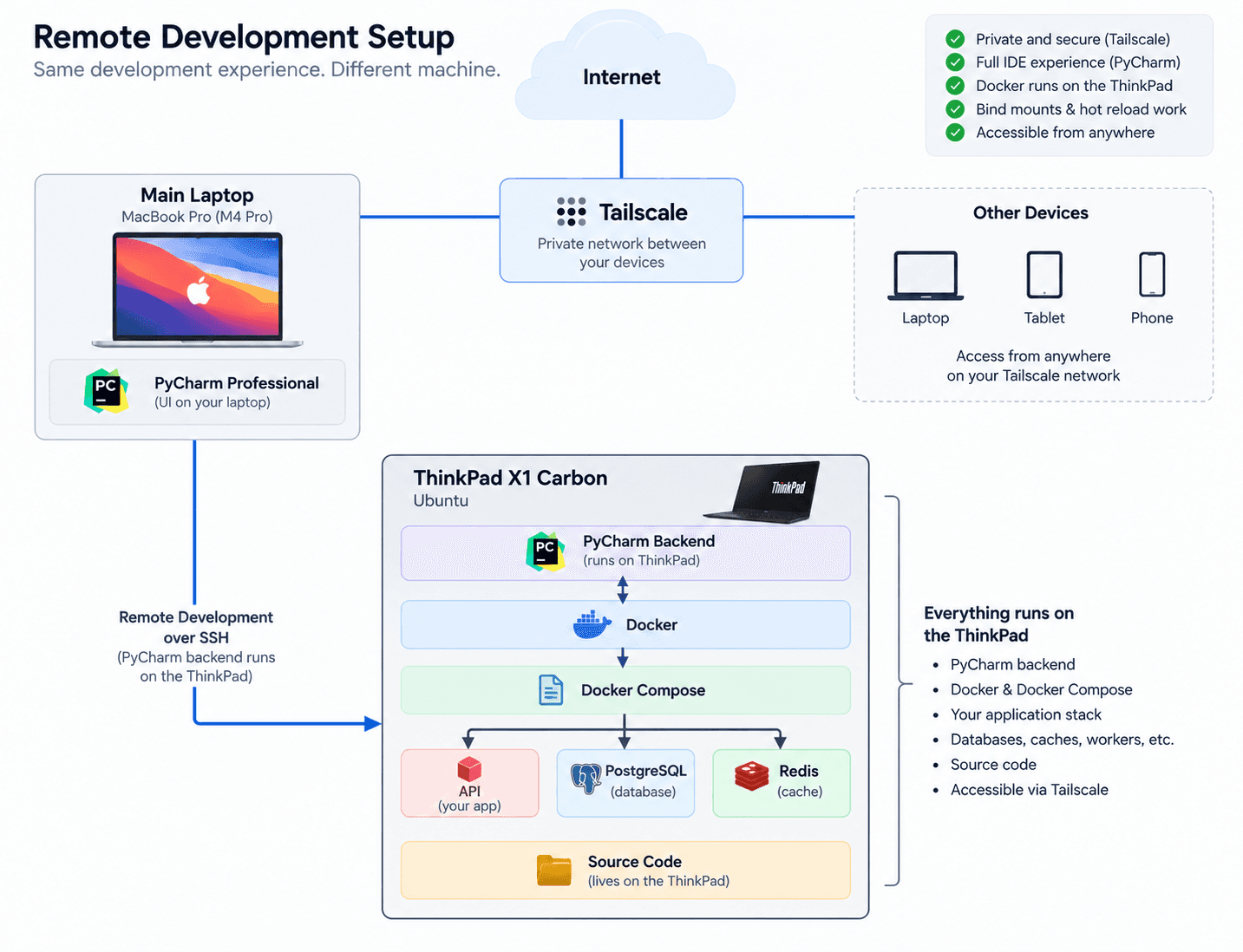
The whole setup: the same development experience, on a different machine. The laptop is just the screen and keyboard — everything heavy runs on the ThinkPad.
The one decision everything else follows from is that the development environment lives entirely on the ThinkPad — which quietly dissolves the problems you run into trying to use Docker remotely.
Why not just use a remote Docker context?
Docker has a built-in way to talk to a remote daemon:
docker context create remote \
  --docker "host=ssh://user@remote-machine"

docker context use remote
That's useful for some workloads, but not for a bind-mounted development stack. Suppose a Compose file contains:
volumes:
  - ../apps/api/src:/app/src
With a remote daemon, that path is resolved on the remote machine — where my local source tree doesn't exist. So now I need a second system to sync the source across:
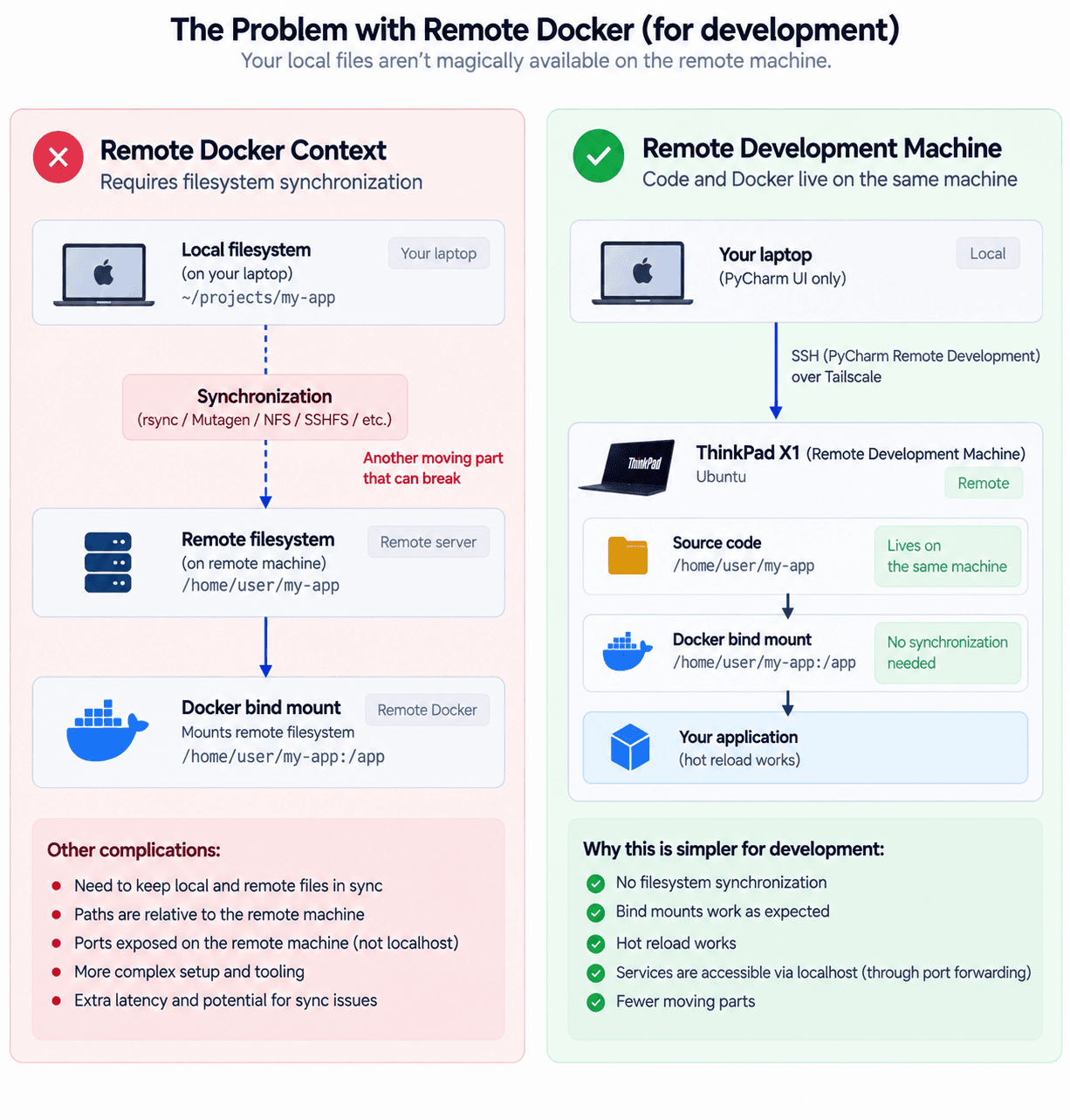
A remote daemon means your source has to be copied to the remote machine before the bind mount can see it — one more thing that breaks on its own.
You can do that with rsync, Mutagen, NFS or SSHFS, but now the environment has
another moving part that can fail independently. The ports don't line up either:
if the app serves on localhost:8001, that's actually listening on the remote
box, and host-side tools reaching for localhost:5432 end up talking to the
wrong localhost. Credentials and host tooling have to be duplicated over there
too.
At that point I realized I didn't want a remote Docker daemon.
I wanted a remote development machine.
The simpler model
The ThinkPad is the development machine; my main laptop is just the display and keyboard.
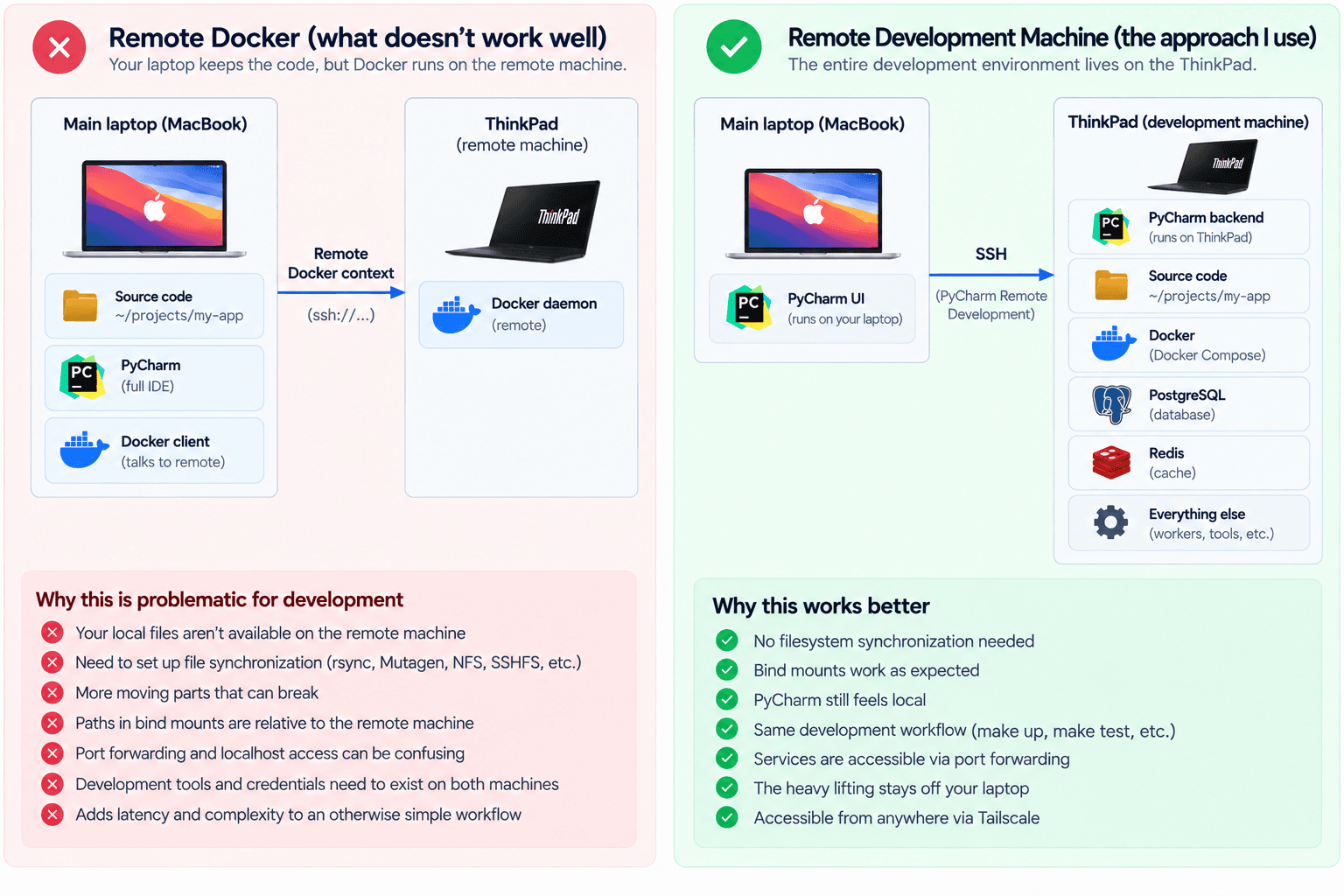
The laptop keeps only the PyCharm UI. Source and containers sit on the same machine, so there's no synchronization layer to go wrong.
There's no filesystem sync layer, because the source code and the containers are on the same machine.
Hardware
The server is a ThinkPad X1 Carbon (6th gen) running Ubuntu — an Intel Core i7-8650U (quad-core, turbo up to 4.2 GHz), 16 GB of LPDDR3 soldered to the board (so 16 GB is the hard ceiling), and a 512 GB NVMe SSD. Not a powerful workstation, and that's part of the experiment: the goal isn't a compute monster, it's to move the persistent, resource-heavy parts of my environment off my primary laptop.
Ubuntu already had most of what I needed — OpenSSH, Docker Engine and Docker Compose. I didn't even install an IDE on it: JetBrains Gateway downloads and manages the remote backend for you, so the ThinkPad never needs PyCharm installed by hand.
Setup
1. Enable SSH
Ubuntu already had OpenSSH. I confirmed the socket was listening:
systemctl status ssh.socket
Active: active (listening)
Listen: 0.0.0.0:22
        [::]:22
Then I connected from my main laptop, and the X1 was just another machine on my LAN:
ssh naad@192.168.1.75
2. PyCharm Remote Development
This is the key part. PyCharm Professional does remote development over SSH (I connect through JetBrains Gateway), so I pointed a Remote Development connection at the ThinkPad, where the project lives:
/home/naad/project
PyCharm runs its backend on the ThinkPad and the UI on my laptop. Open the
PyCharm terminal and hostname returns the ThinkPad's name; docker ps shows the
ThinkPad's containers. That's the whole point.
Worth addressing the obvious worry — does typing feel bad over a remote link? Not really, because JetBrains ships an actual backend to the remote machine rather than streaming a screen: the UI stays local and only project state crosses the wire, so editing feels native even over the internet. In practice latency sits under 30 ms on the same network and under 80–100 ms over any other decent connection — low enough that I stop noticing it.
3. Docker stays completely normal
I didn't put Docker into a remote context. The ThinkPad just runs Docker Engine locally:
docker context show
default
Compose works normally too:
docker compose version
So the existing workflow doesn't need to know the screen is somewhere else —
make up still means what it always did. The only difference is that it runs on
the ThinkPad.
4. Hot reload still works
This was one of the most important requirements. A typical stack has a bind mount like:
volumes:
  - ./src:/app/src
Because the source and Docker are on the same machine, hot reload keeps working with no network filesystem in the loop:
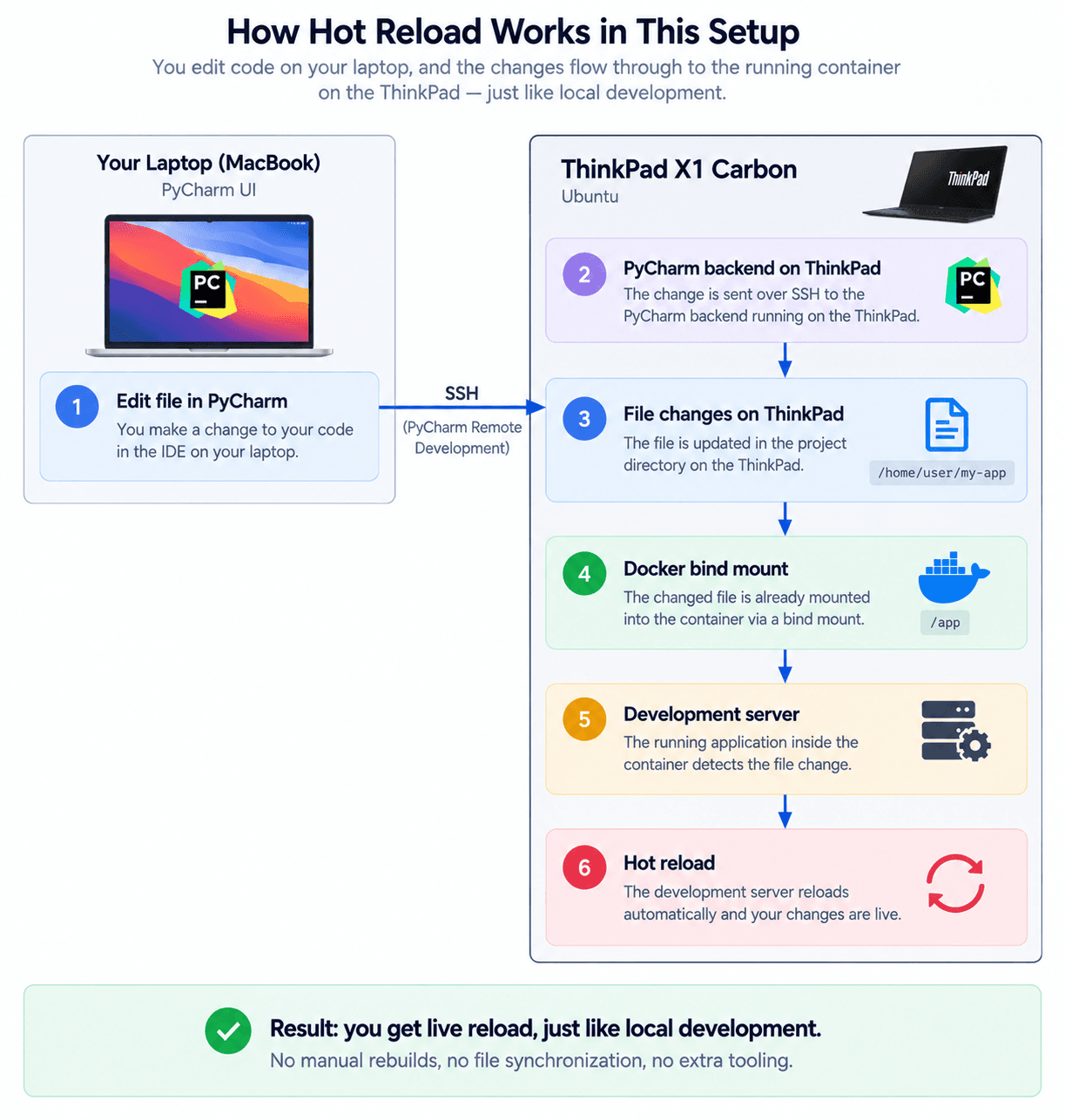
Edit → backend on the ThinkPad → file on disk → bind mount → reload, all on one box.
Much nicer than trying to sync a local source tree into a remote Docker host.
5. Accessing development servers
One problem remains: the dev server runs on the ThinkPad (say
192.168.1.75:8001) but I want to open http://localhost:8001 on my laptop.
PyCharm's remote environment forwards the relevant ports for me:
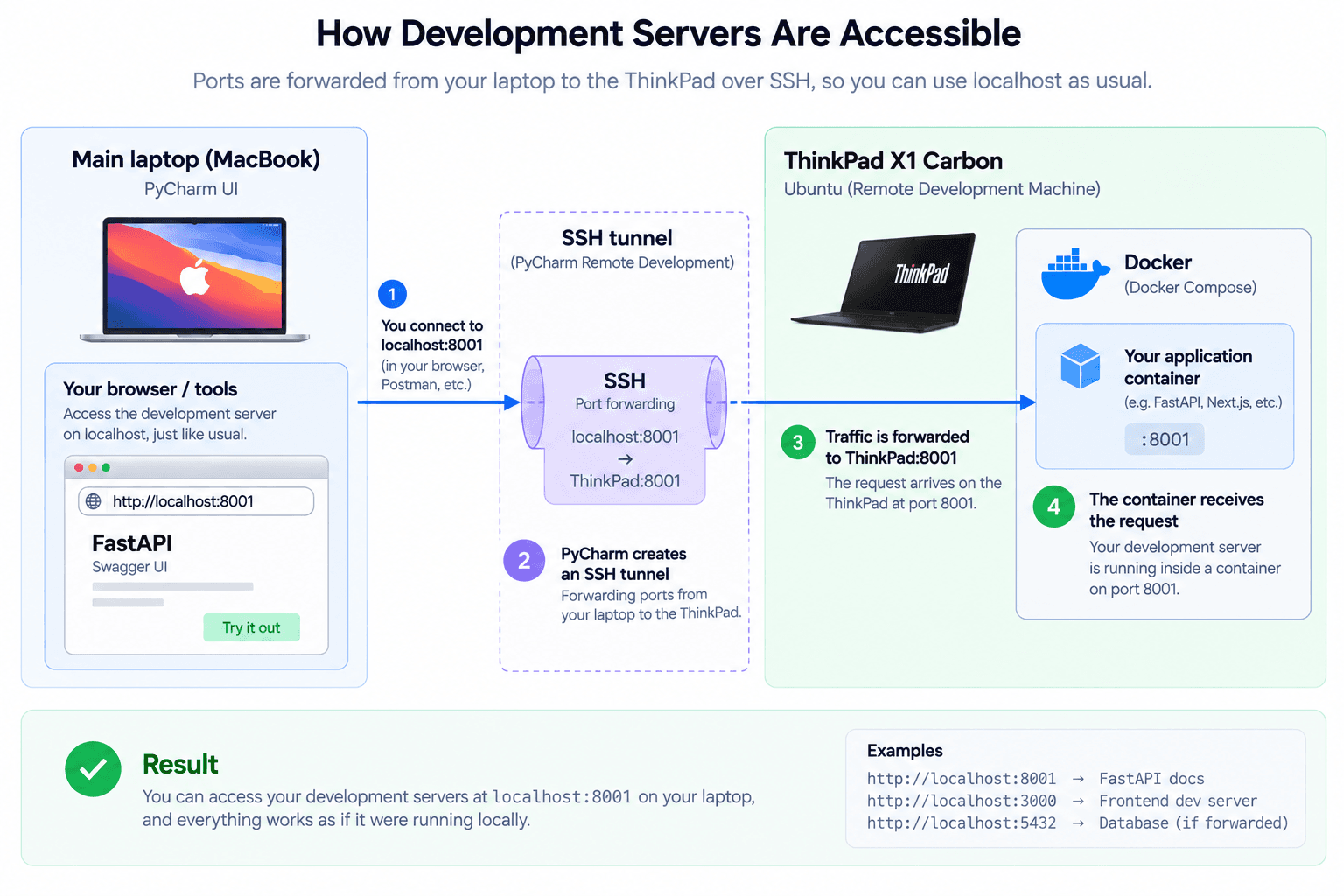
An SSH tunnel maps the ThinkPad's port onto localhost on my laptop.
So FastAPI /docs, admin panels and frontend dev servers all stay reachable from
the browser on my main machine, and the app never has to know it's remote.
6. Making it work outside the LAN
The LAN setup was fine at my desk, but I didn't want the ThinkPad reachable only from home. I could have set up router port forwarding — I'd rather not poke a hole in my router, so I installed Tailscale instead.
On Ubuntu:
curl -fsSL https://tailscale.com/install.sh | sh
sudo tailscale up
After authenticating, the ThinkPad picked up a Tailscale address:
100.102.25.26
I installed Tailscale on my laptop, signed into the same tailnet, and connected directly:
ssh naad@100.102.25.26
The point is that SSH, Docker, Postgres and my dev services are never exposed to the public internet — Tailscale gives the machines a private network between them. One caveat worth knowing: Tailscale usually makes a direct connection, but when it can't punch through a NAT it falls back to a relay (DERP), which adds latency. That's the one situation where remote dev can feel sluggish.
7. PyCharm over Tailscale
Once SSH worked over Tailscale, I pointed the Remote Development connection at the ThinkPad's Tailscale address:
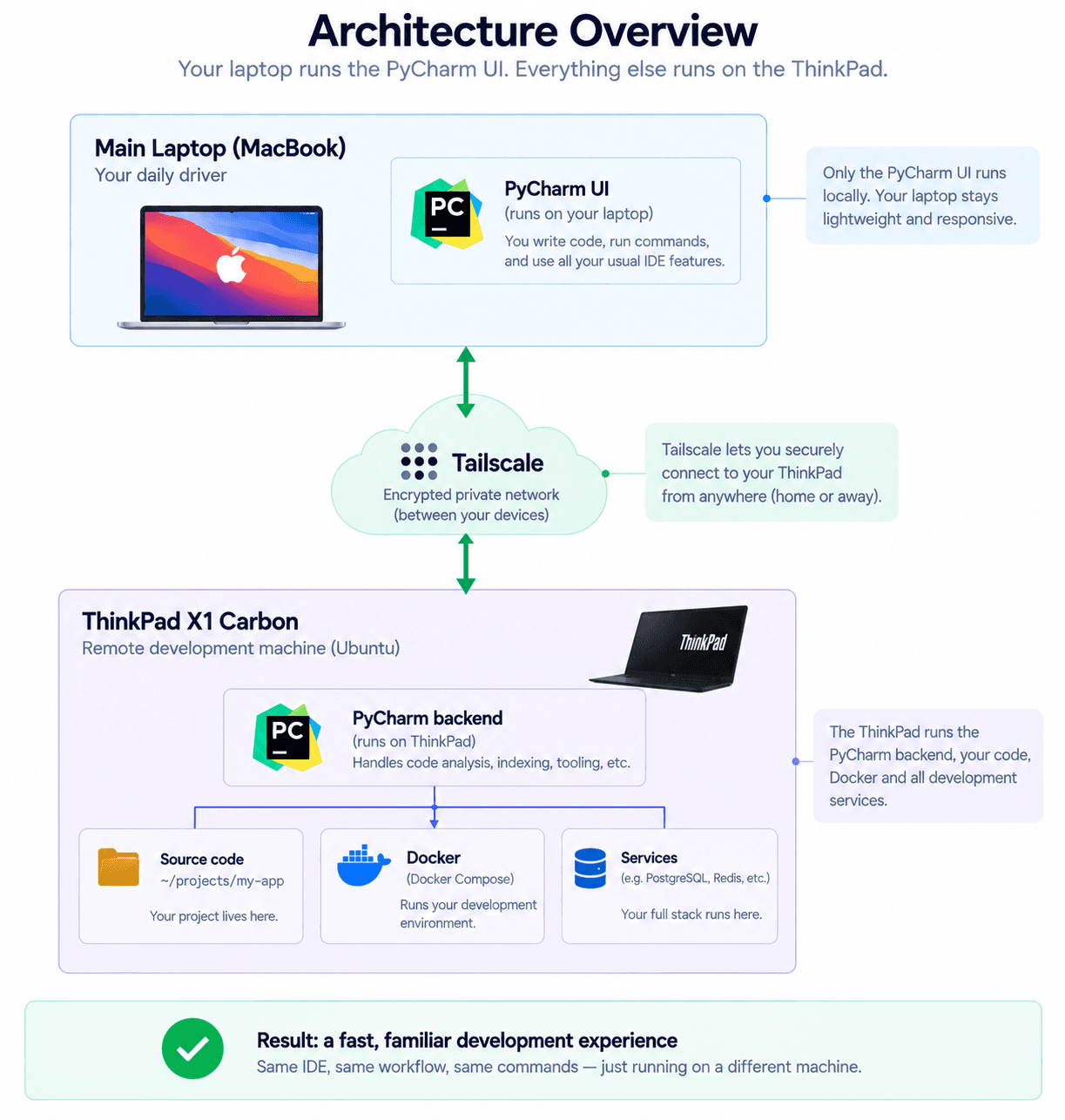
With Tailscale in the middle, the physical network stops mattering.
Now it doesn't matter whether the two machines are on the same physical network:
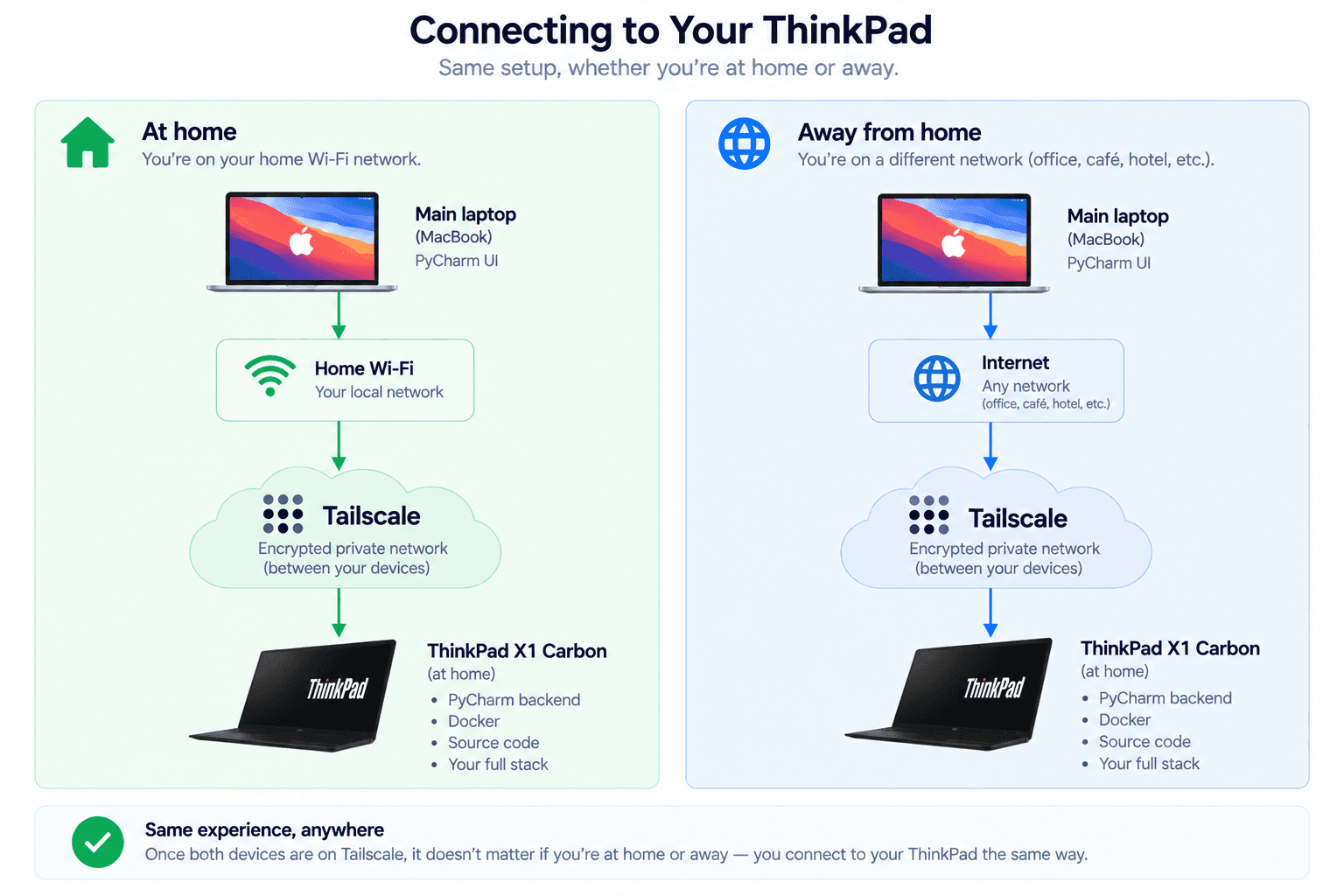
Home wifi or a café, the connection and the stack behind it are identical.
8. MagicDNS
Remembering 100.102.25.26 isn't pleasant, so I used Tailscale's MagicDNS to
address the machine by name. I renamed the ThinkPad to x1-dev, which lets me
use it for both SSH and the PyCharm connection:
ssh naad@x1-dev
9. SSH keys
Once the basics worked, I switched from passwords to SSH keys:
ssh-keygen -t ed25519
ssh-copy-id naad@x1-dev
I've left password auth on as a fallback, and I'm comfortable with that because
sshd isn't reachable from the public internet — the only networks that can see it
are my LAN and my tailnet. If I wanted to lock it down further I'd bind sshd to
the tailscale0 interface (or block port 22 with ufw), since right now
systemctl status shows it listening on 0.0.0.0:22, i.e. open to every network
I plug into.
10. Keeping the ThinkPad awake
A remote dev server is useless if it goes to sleep. The lid config is only half
of it — I created /etc/systemd/logind.conf.d/10-dev-server.conf:
[Login]
HandleLidSwitch=ignore
HandleLidSwitchExternalPower=ignore
To stop it suspending at all, mask the sleep targets, then reload logind so the change takes effect:
sudo systemctl mask sleep.target suspend.target hibernate.target hybrid-sleep.target
sudo systemctl restart systemd-logind
On a desktop install, GNOME's own power settings can still override this, so it's worth checking there too. And since the machine now lives plugged in around the clock: a battery pinned at 100% degrades fast, so I capped charging at 80% using the ThinkPad's charge threshold:
echo 80 | sudo tee /sys/class/power_supply/BAT0/charge_control_end_threshold
The operating rule is simple — keep it on power and on the network. Lid closed, display off, still reachable over Tailscale.
The resulting workflow
Day to day, nothing about how I work changed. From PyCharm I run make up,
make down, make migrate, make test; I edit code, hot reload fires, the
database is where the app expects it, bind mounts work, FastAPI /docs loads,
ports forward to my laptop, and I can reach all of it from outside my house. The
physical topology moved; the workflow didn't.
The reason for the whole exercise was resource pressure, so here's the part that actually matters, with the full stack running:
| With the full stack up | MacBook Pro (before) | ThinkPad X1 (now) |
|---|---|---|
| Memory in use | pinned near 98% of 24 GB | ~15 GB of 16 GB (≈10 GB with just PyCharm) |
| CPU under load | never the bottleneck | 5–25% |
The number that actually stung was memory: the Mac sat pinned near 98% with the stack up, which is exactly the pressure that made everything else feel slow. The X1 runs close to its own 16 GB ceiling, but that's fine — it's a dedicated box, and the point is what's no longer on the Mac. My laptop now carries only the IDE UI and a browser, so the pressure that started all this is simply gone.
Why this beats the setup it replaced
The interesting part isn't that a ThinkPad can run Docker — of course it can. It's that the boundary between "local" and "remote" development almost disappears. My laptop no longer has to run containers, keep databases alive, hold large Docker volumes, store dev datasets, run background jobs, or burn CPU while I'm doing something else. It becomes a thin client. Meanwhile the X1 sits on a desk, plugged in, lid closed — and if I replace my laptop tomorrow, the environment doesn't move. I just install Gateway and Tailscale and connect to the same machine.
There's an honest tradeoff, though: the entire environment now lives on one old
SSD. Git covers the repo, but not my Postgres volumes or dev datasets, so a dead
disk would take those with it. For now that's a risk I'm fine with — the local
data is reproducible enough that I haven't bothered with a backup — but the
obvious fix when it matters is a nightly pg_dump cron off the ThinkPad.
Where this could go
The obvious next step is adding machines. Tailscale gives me the network layer — it doesn't pool CPU and RAM for me, but it makes a distributed setup straightforward to build on top of:
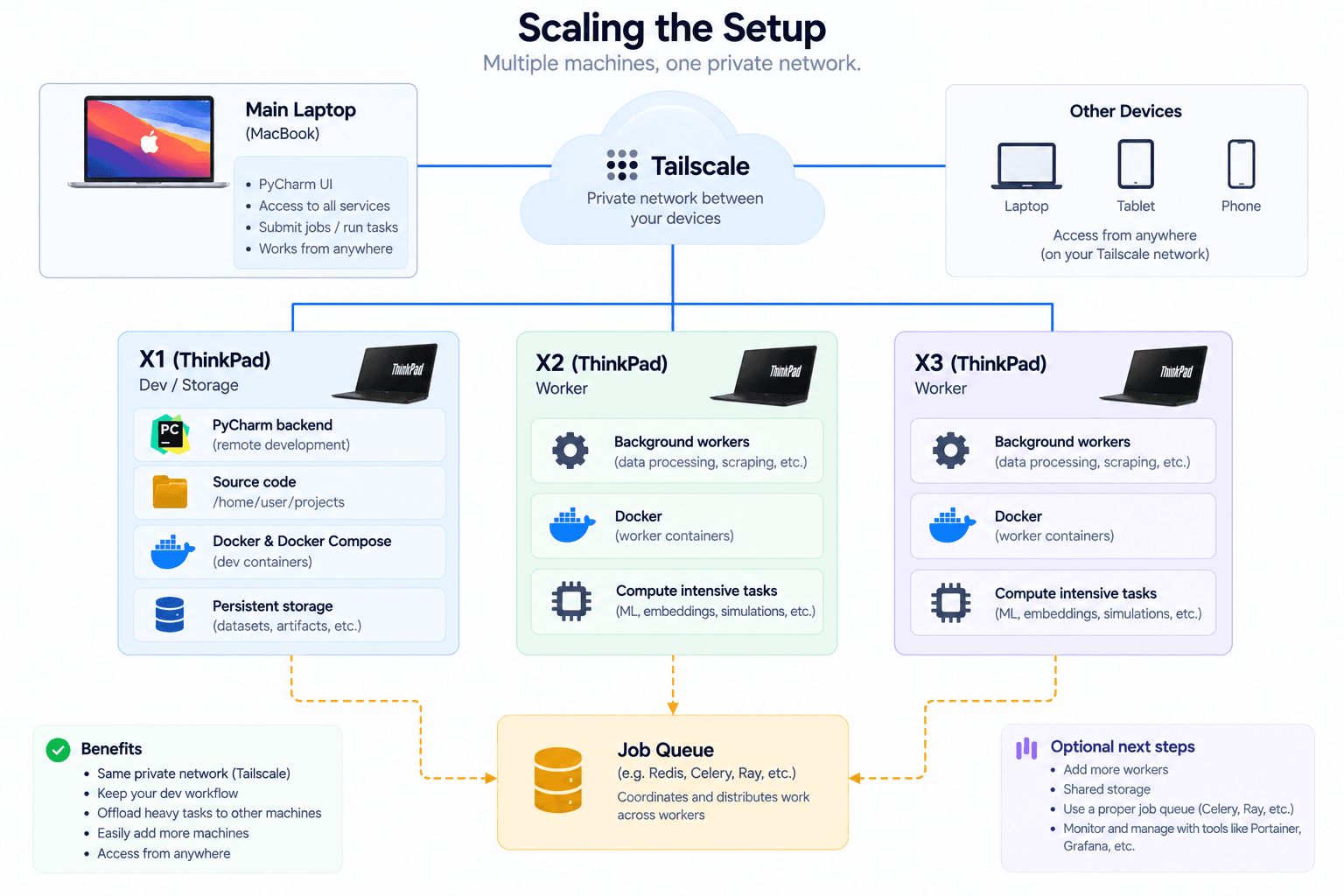
Where it could scale next: more machines on the same tailnet, one for dev and storage and the rest as workers pulling from a shared job queue.
For anything parallelizable — data processing, scraping, test execution, ML inference, embeddings, batch jobs, simulations — the extra machines could become workers, and that's where Ray, Celery, Nomad or Kubernetes start to earn their place depending on the workload.
But I'm not starting there. The nice thing about this setup is that every layer is independently useful: I don't need a cluster to benefit from the X1, I don't need Kubernetes to run Docker Compose, and I don't need to expose anything publicly to reach my own machines.
The main lesson
The biggest thing I took from this is that remote development doesn't require making Docker remote — that's the abstraction I got wrong at first. If your environment leans on bind mounts, local databases, hot reload and host-side tooling, the cleaner move is usually:
Move the entire development environment to the remote machine, and move the IDE interface to you.
What you get back is close to local development:
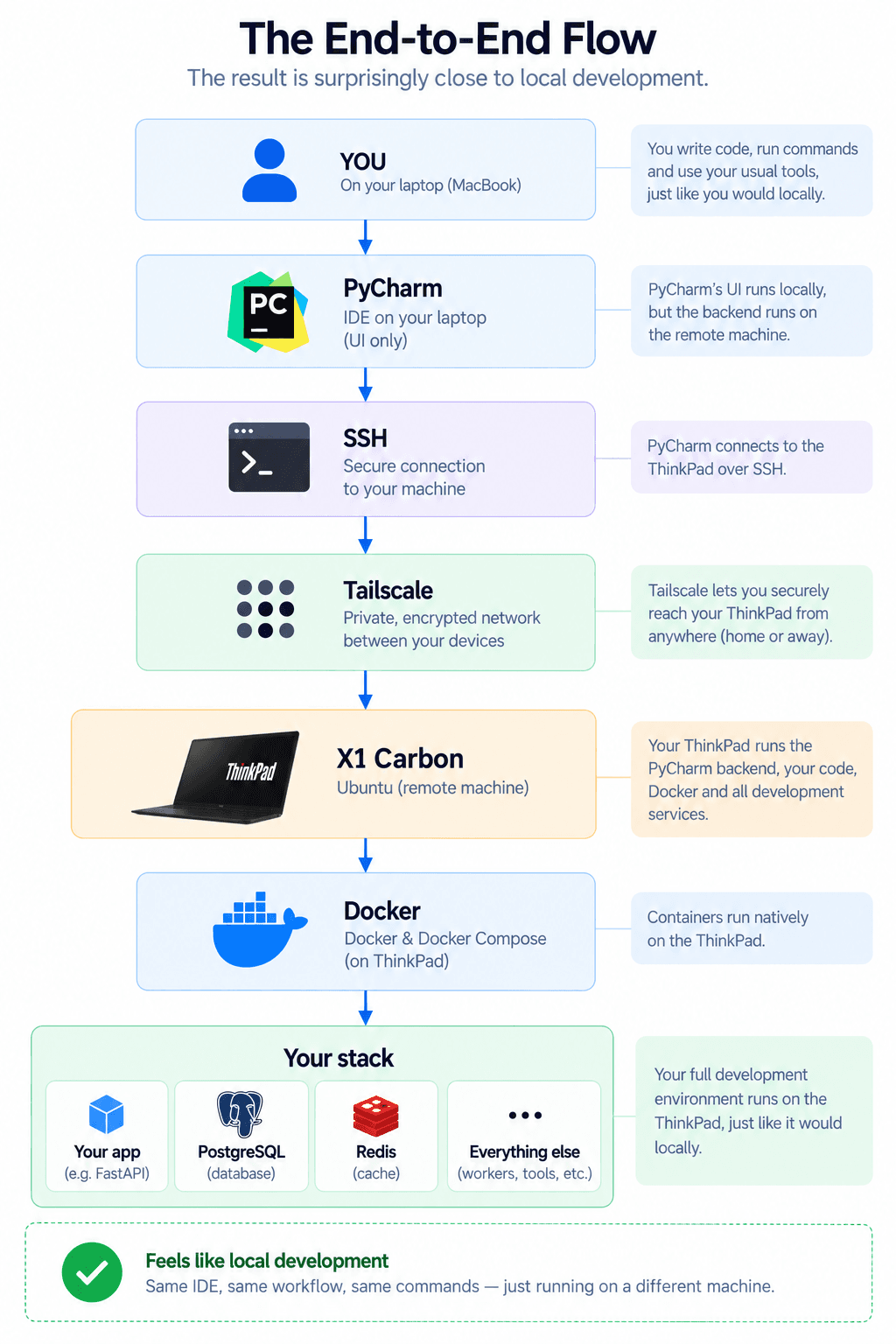
You at PyCharm, down through SSH and Tailscale to the X1 running your stack. It feels local because, functionally, it is.
And once the plumbing exists, adding a service is just another Docker Compose project. For the price of a laptop I already owned, I got a small private development environment I can reach from anywhere — not a datacenter, but a lot more useful than a ThinkPad collecting dust.